Features
Everything Qalam does,at a glance.
62 features in 12 groups. Each one in a line, so you know what it does without reading a manual.
62 of 62 features
Talk to edit
AI agent
An AI agent sits beside your timeline. Say what you want and watch it cut, caption and animate, live, in the editor.
Edit by asking
Type or say “cut the pauses, add captions, put a map here” and the edit lands on your timeline while you watch.
Use the AI you already have
Qalam works with the Claude Code or Cursor on your computer, signed in with your own account, or any model through your OpenRouter key.
Bring any coding agent
23 agents can connect, including Codex, Gemini CLI, OpenCode, GitHub Copilot, Windsurf, Cline, Aider, Zed, Goose and Amp. Several can share one chat and hand work to each other.
Every change is undoable
The agent edits through the same safe path you do. Each change is checked, named and one Undo away.
Pin notes on the frame
Press P, click the picture, write “make this bigger”. The agent fixes it and ticks the note off.
Make many videos at once
Ask for five versions and five helper agents build them side by side, each in its own project.
Talk instead of typing
Dictate to the agent with ⌘⇧D. Speech is turned into text on your Mac.
Point at anything
@-mention a clip, a moment, a file or a marker so the agent knows exactly what you mean.
Approve each step
Choose how much freedom the agent gets: ask first, accept edits, plan only, or allow everything. It asks before big moves.
Rich replies
Answers come with pictures, playable previews and one-click next steps, not walls of text.
A real editor
Editing & timeline
Everything you expect from a pro timeline, fast enough to stay smooth with a thousand clips.
Familiar timeline
Main track plus unlimited video, picture, text and effect layers, and up to 20 audio layers.
Split, trim, ripple
Magnetic main track, linked clips that move together, groups and nested clips with their own timeline.
Remove silences in one click
Finds the dead air in a talk and closes the gaps for you.
Keyframes and easing
Animate position, scale, rotation and opacity with 13 easing curves or your own.
Crop, flip, speed, reverse
Freeze frames, reverse, change speed, replace a clip in place, or pull its audio out.
Any shape of video
16:9, 9:16, 1:1, 4:3 or any size, with safe-area guides for Shorts, TikTok, Reels and Instagram.
Undo that tells you what
Every undo names the change and jumps to where it happened.
Your shortcuts
72 actions, every one of them rebindable. Shuttle with J-K-L style keys, with sound.
Bring stills to life
Animate pictures & people
Turn a photo into a moving character, bend pictures, and make text follow anything that moves.
Character rig
Cut a person out of a photo and they become a puppet: walk, run, jump, dance, wave, point or nod.
16 joints, 7 body motions, 5 gestures. Drag a hand or foot to pose it.
Puppet warp
Pin a picture and bend it over time, like a living sticker.
Motion tracking
Draw a box around anything; text, stickers and pictures follow it. Or let the camera follow it with a smooth zoom.
Captions that pop
Captions
Accurate captions in minutes, styled the way short-form viewers expect.
Auto captions on your Mac
Whisper runs right on your computer: free, private, word-accurate.
Or let CapCut do it
Qalam sends the audio to CapCut's auto captions and brings back every word with its exact timing.
15 cloud models
Pick from ElevenLabs Scribe, GPT-4o Transcribe, Deepgram, AssemblyAI, Gemini and more, with accuracy and price per hour shown.
6 caption looks
Classic, word-by-word, pop, highlight, highlight box and karaoke, with full control of font, outline, box, glow and shadow.
Import subtitles
Bring YouTube subtitles or your own SRT. Export SRT or plain text.
Right-to-left text
Urdu, Arabic and other right-to-left scripts render correctly.
No After Effects
Motion graphics
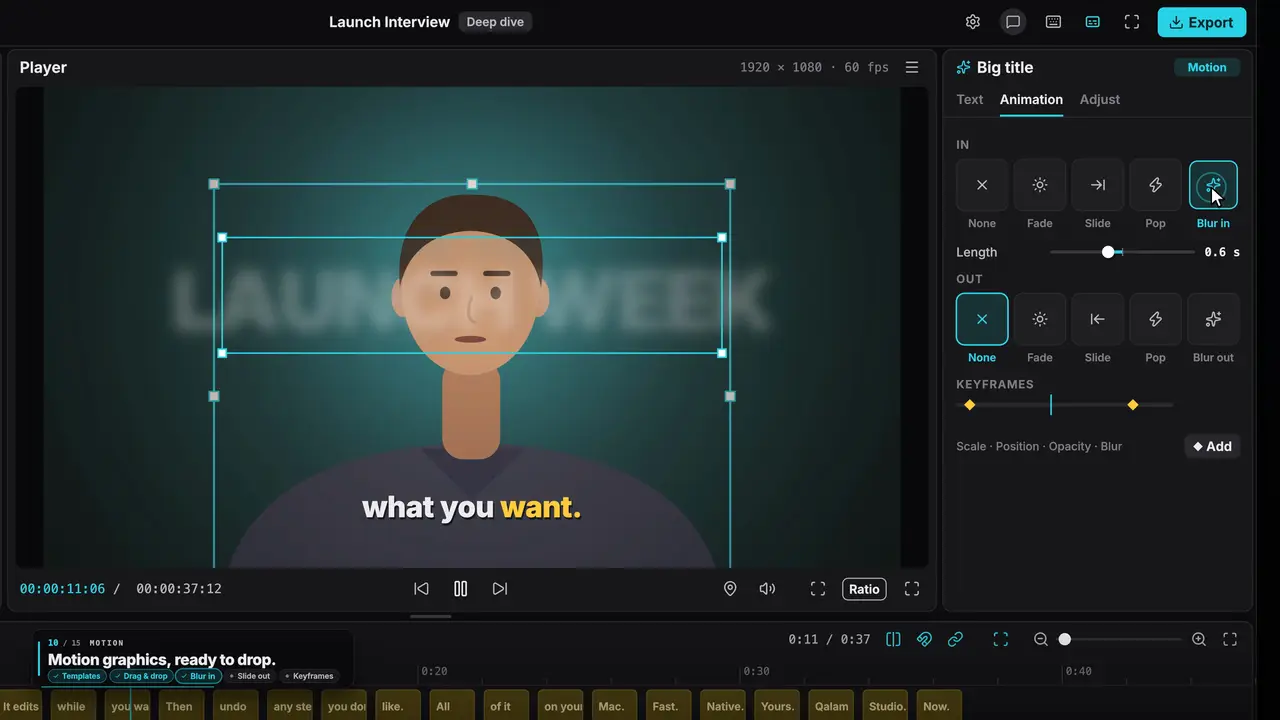
Titles, counters, lower thirds and whole animated scenes that play live in the editor, no render wait.
Ready-made templates
Title cards, number counters, lower thirds, like-and-subscribe cards, maps and 3D scenes. Change the words and colours, done.
55 animations
28 in, 20 out and 7 looping, including 13 text animations like typewriter, word pop, highlight sweep and decode.
Scenes the agent writes
Need something new? The agent writes a custom animated scene, and it plays live in the player.
Edit inside the scene
Click any element in the player to move it, or double-click text to retype it.
Sound comes with it
Templates bring their own sound effects: a typewriter types, a pop pops.
No Blender either
3D & maps
Documentary-style maps on real satellite imagery, and full 3D worlds with your own models.
Documentary maps
The globe turns, the camera flies in, routes draw themselves mile by mile, pins and labels drop on your words.
Real satellite imagery
Satellite, HD satellite and night lights, 5 map themes, about 7,300 cities in English, Arabic and Urdu.
3D worlds without code
Drop in models, pick a sky, set the lights and camera moves. Cartoon, low-poly or realistic.
Any 3D file
GLB, glTF, FBX, OBJ, USDZ, Blend, STL and more, animated and skinned, lit by a real HDRI sky.
Cartoon 3D stories
Flat cartoon characters in a painted 3D world, with gliding cameras.
Sound from a sentence
Voice & sound
Clean up your voice, generate a voice-over, and describe the sound effects you need.
Enhance voice
Removes room noise and echo on your Mac. Nothing to download.
AI voice-over
Type a script, pick a voice. Uses your ElevenLabs or Vibi key.
AI sound effects
Describe it (“deep cinematic boom”) and it lands on the timeline.
Loudness, fades, keys
Normalize loudness, fade in and out, and draw volume over time in dB.
Free sound library
Search free sound effects and music, with credits written for you.
Look finished
Effects & colour
Transitions, effects, colour grading and background removal, all on the GPU.
18 transitions
Dissolves, pushes, wipes, zooms, flashes, film burns and light flares. Some bring their own sound.
14 effects
Film grain, VHS, CRT scanlines, glow, light leaks, shake, vignette and more.
Colour grading
8 looks, plus basic, HSL, curves and colour wheels, per clip or across everything with an adjustment layer.
Remove background
One click on video or photos. Fast, high quality or best, plus green-screen keying and a brush.
Masks and blend modes
7 mask shapes plus a brush, feather and invert; 13 blend modes.
Ship it anywhere
Export
What you see in the player is exactly what you get, in any size up to 4K.
Up to 4K, up to 60 fps
MP4 or MOV, H.264 or HEVC, 480p to 4K, with a file-size estimate before you start.
Fix a note in seconds
Only the parts that changed are rendered again, so a small fix doesn't mean a full re-export.
Publish pack
Titles, description, tags, chapter timestamps and thumbnails, ready to paste.
Audio and captions too
Export just the sound (MP3, WAV, AAC, FLAC), captions (SRT, TXT) or a still frame.
Your way of editing, saved
Styles
A style is a whole editing recipe: steps, brand, fonts, caption look and rules. Use one, or build your own with the agent.
Punchy Shorts
Vertical shorts in 10 steps: hook, script, voice, cut, captions, motion, sound, review, publish, final.
Deep Dive
Long-form explainers in 14 steps, from topic and research to thumbnail and publish.
Build your own style
Show the agent a few videos you love. In 9 guided steps it builds a reusable style from them.
Starts from 11 kinds: talking head, podcast clips, faceless explainer, tutorial, cartoon story, product promo and more.
Approval gates
Each step can stop for your OK before the agent moves on.
Built different
Fast, local, private
A native app written in Rust, drawing every frame on your GPU. Your footage never leaves your computer.
Runs on your computer
Your projects, media and keys stay on your machine. Qalam goes online only when you ask it to.
What you see is what you export
Preview and export draw frames with the same GPU engine, so nothing shifts in the final file.
Smooth with big projects
The interface stays at 120 fps with a thousand clips on the timeline.
Measured on an Apple Silicon Mac in Qalam's own benchmark project.
Free up memory
Preview quality levels and automatic memory clean-up keep long sessions light.
55 commands
A full command line with JSON output: import, cut, caption, render. Every edit is checked and undoable.
Instant import
Huge files import in a blink without using extra disk space. Or pull a video, with subtitles, straight from YouTube.
Fonts on demand
Any Google Font, or your own, shared across every project.
Want to hear when it opens?
Join the waitlistKeep exploring
Showcase
Eight videos made in Qalam: a documentary explainer, product films, map videos and cartoon 3D.
Watch the videosIntegrations
Claude Code, Cursor, OpenRouter, ElevenLabs, CapCut and more: bring the accounts you already have.
Pricing
A paid app, priced before launch, waitlist first. AI isn’t in the price: you use your own provider.
Download
In private testing on macOS, Windows and Linux coming soon. Get on the list to hear first.
About
Why Qalam exists, and the four ideas it is built on.
Home
The editor you talk to, in two minutes: what it does and how it works.